Configuring your subquestions
Last updated
"Configuring your Subquestions" empowers you to determine the conditions under which specific Subquestion will be presented to technicians in the field. By tailoring the display of Subquestions based on relevant conditions, you enhance the precision and relevance of data collection.
Follow these steps to configure a Subquestion to display based on specific conditions:
- Select the Target Subquestion:
Begin by identifying the Subquestion that you wish to configure. This could be a Subquestion associated with a parent question or a standalone Subquestion within your data collection process.
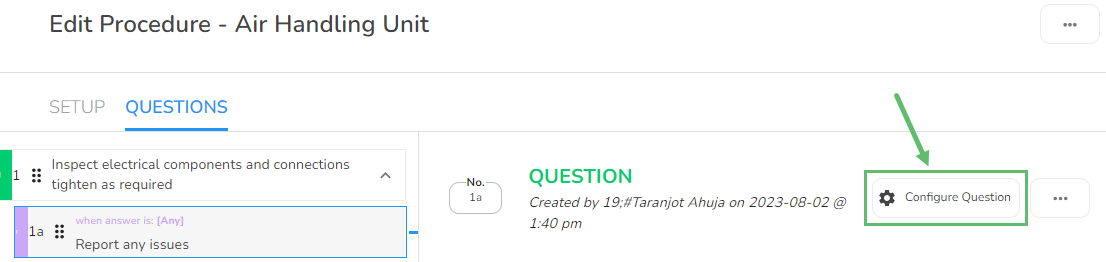
- Access the Configuration Options: Click on the "Configure Question" setting button associated with the chosen Subquestion. This option enables you to access and modify the configuration settings of the Subquestion.
- Update Condition and Response: Within the configuration interface, you'll find fields to update the "Condition" and "Response" for the subquestion. The "Condition" defines the circumstances under which the subquestion will be displayed to technicians. The "Response" outlines the data or information you seek to gather through this subquestion.
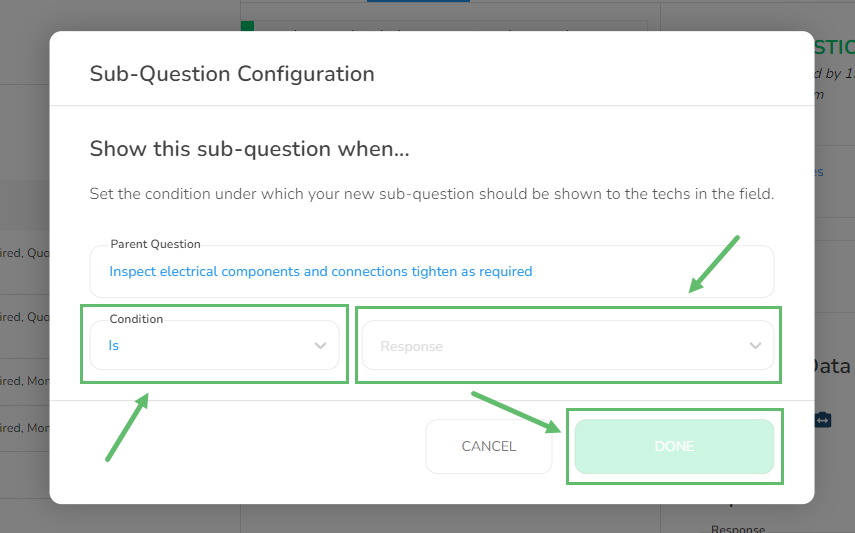
- Save Changes: Once you've updated the "Condition" and "Response" fields to your satisfaction, click on the "Done" button to save your changes.