What are Building Groups?
Last updated
Building Groups are a way of grouping your Buildings. For example, Building Groups can be used to organize Buildings by type, location, or any other classification that best suits your needs. They are a way of creating new filters for your data.
Note:It is possible for a Building to belong to multiple Building Groups.
Tip:Building Groups can be helpful for organizing your Asset service history reports based on a specific set of Buildings. For example, you could create a Building Group that splits up your residential and commercial buildings. Or, you can create a Building Group based on the district/zone of your buildings.
This article will go over the following topics:
- What is a Building Group Tree
- Selecting and expanding a Building Group
- What are Sub Group and Top-Level Group?
What is a Building Group Tree?
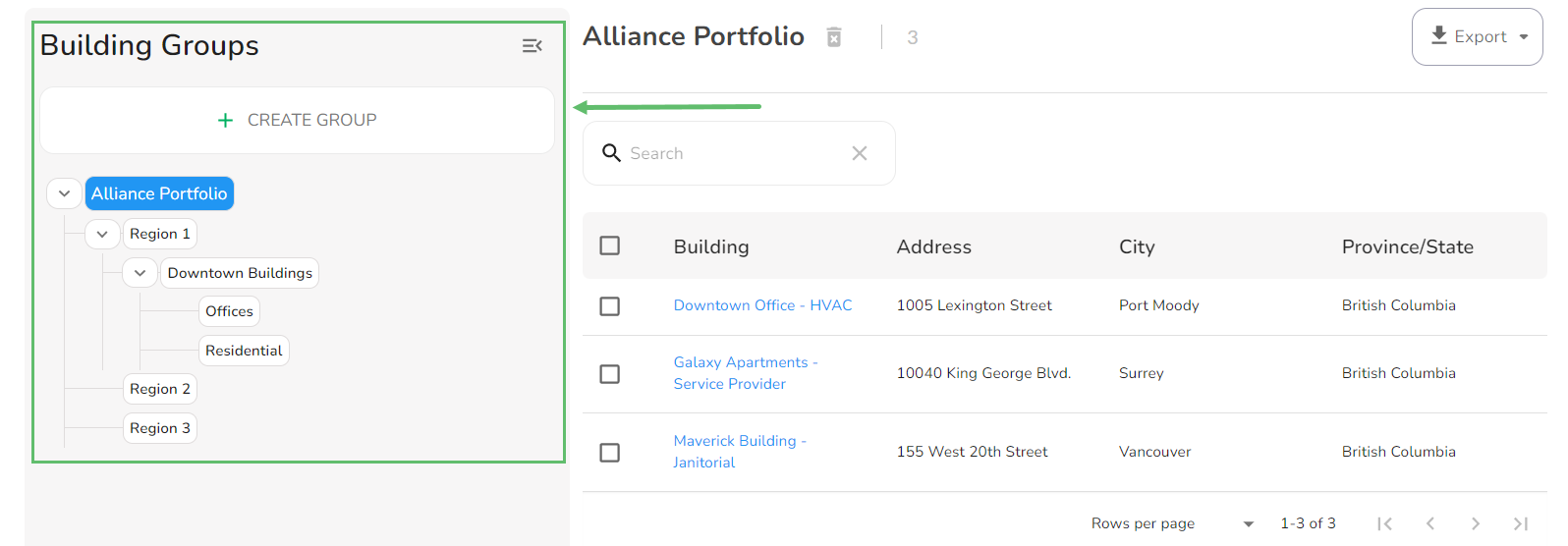
A Building Group tree is where all of your Building Groups are organized. It is found on the left side of your Buildings table and can be expanded or collapsed.
Selecting and expanding a Building Group
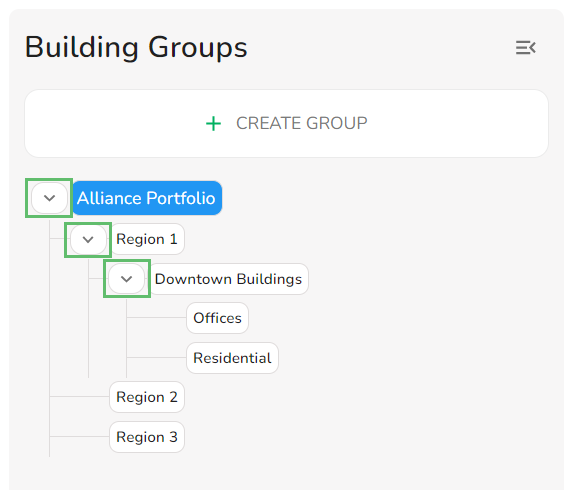
You can expand the Sub Groups and view the Buildings that are nested in those groups by clicking the right-arrows.
To select a group, simply click on its name.
What is the difference between a Sub Group and a Top-Level Group?
A. Top-Level Group
A Top-Level Group is a Building Group that is nested under the main organization portfolio. A Top-Level Group can have one or more Sub Groups underneath it.
B. Sub Group
A sub is a part of a Top-Level Group. A Sub Group can also have its own Sub Groups. You can go unlimited levels deep when creating Sub Groups.